Showing posts with label Tech Tip. Show all posts

Monday, April 11, 2016

Spring into April- Four Free Poetry Apps

Hello Friends! It's Erin from The Elementary Darling, and my peachy friends and I are sharing our favorite new ideas to get you through the month of April!


Today I am here to share four of my favorite FREE poetry apps!


I teach first grade and I was searching for the perfect app for younger students to learn about poetry. Thankfully, I came across these wonderful apps from http://www.readwritethink.org/. They are available for ipad and android so they are perfect for any device. What I like about them is the fact that they are easy for the students to use and the app organizes the poem for the student!

1. Haiku

This app reminds the students to count the syllables, and provides a space for them to brainstorm words.

2. Acrostic Poems

This app provides the student with an example of  an acrostic poem. It then leads them through a brainstorming session, and gives hint words for the acrostic poem.


3. Theme Poem

The theme poem app provides the students with different shapes. The shapes include sports, school, and other kid friendly shapes. The students choose a shape and describe that shape.


4. Diamante 

This app also describes what a diamante poem is and takes the students through the steps to create a diamante poem. It even labels each line and what the student should include in the poem.


All of these apps allow you to save them to the ipad, which would make them easy to save to your computer and print or email! This way, if you only have one device , the students could use this as a center or with a partner! Another great resource for poetry apps is this post from Erintegration! 

Stay tuned for more ideas this month from the Peach! And if you try any of these fabulous FREE apps, let me know!

For even more ideas from The Primary Peach, be sure to follow us on InstagramPinterestand Facebook to catch all the latest news and updates!


Saturday, November 21, 2015

Helpful Harvest: Make Worksheets Come Alive


We are 21 days into our Helpful Harvest series here at the Primary Peach and I have learned so much from my fellow Peaches!  What an amazing group of educators!!  I'm Meghan from Keeping Up with Mrs. Harris and today, I decided to integrate a technology tip for you that will make your children scream with excitement!  Seriously, go ahead and know that it will be loud in your classroom during this activity!  


YES!  Let's make those worksheets come ALIVE!  You are going to be just as excited as your students when you see this in person!  Checkout the steps below!


Head on over to Quiver Vision's website.  First, I would love for you to watch the video so you can see for yourself the fun that you and your students are in for.  Then at the top of the site, click "Education".  This will take you to the page with the downloadable worksheets that are available.  There are a ton of science and social studies content related pages and some just for fun.  These are perfect for your writing class.  Let them pick their own page for a fun write, read the passage on the worksheet and get them writing.  I say, save the "come to life" part for the very end and just see their excitement!


Students color their pictures with regular crayons or markers!  They can use any colors that they would like to, the app can change between their colors and the real life colors of the object or animal.


Download the app to your iPad.  Now, this is the sad part...it isn't free.  There is a free version, but it only has a couple of worksheets that work with it.  However, I can tell you that the full version is well worth the $7.99.


I let my son color and scan his picture this week for the first time and he seriously dropped the iPad!  When his bug jumped off the page he screamed and then started laughing.  After that, we had to print off nearly every picture from the site just so he could see what they would do.  AND he is only 4!!!  Another feature of the app that I love is that there is an recording of information for some of the pictures as well.  So kids are learning even after their scan!  

Isn't this amazing?  I couldn't think of a better way to be "helpful" than share this with you just in time for the holiday craziness!  You can use this as a time filler during all those stressful moments between now and Christmas.  :)  Enjoy!


Thursday, November 5, 2015

Helpful Harvest: Help with all those sticky notes!


Hey, everyone....it's Deanna from A Primary Owl here to give you a November tip! I don't know about you but I am a compulsive sticky note user. Sometimes I write lists of students on sticky notes and forget why I even wrote their names down! I write sticky notes for everything.
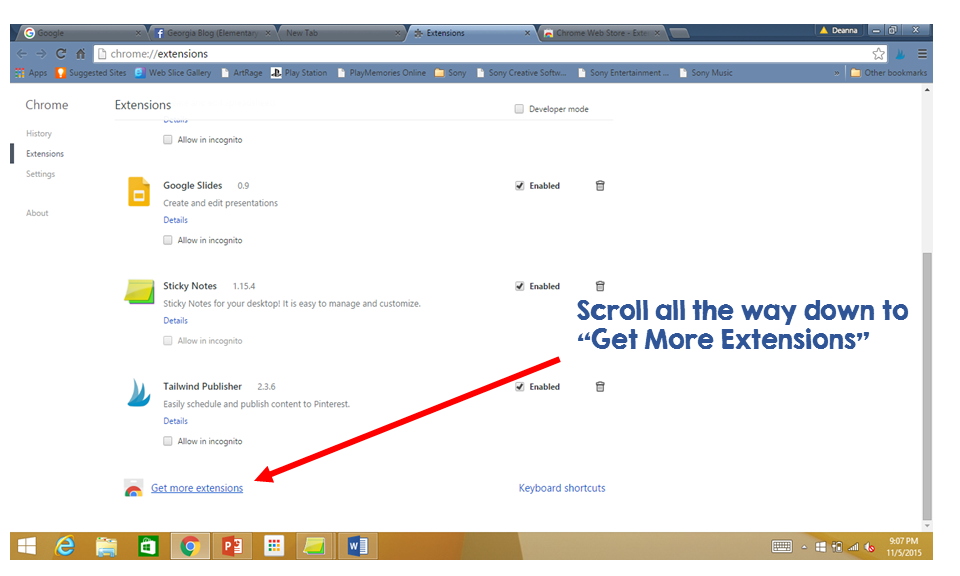
So lately I have been trying out some Google Chrome Extensions and found one that is awesome! If you don't know about Chrome Extensions then this is an easy one to start with....

Here are some easy step by step directions:
After you have added the sticky notes extension to your tray at the bottom, you can click on it anytime to display your notes.

You can change the color, so I color code mine. Lists for home are one color. Lists of students to work with, another color, etc. Then peel them off after you are done with them. 

With the holidays around the corner, this will make life so much easier! My next sticky note??? Maybe start my Thanksgiving grocery shopping list.